Floating Point: IEEE 754
Floating point is a way to represent a huge range of real numbers — from 1e-300 to 1e300 — in
a fixed number of bits, by storing a sign, an exponent, and a fraction (mantissa) instead of
every digit. Almost every language's float/double follows IEEE 754, a standard chosen
specifically so results are bit-for-bit reproducible across different hardware. The tradeoff: most
decimal fractions (like 0.1) have no exact binary representation, which is the root cause of
nearly every "floating point is broken" bug report.
Core Concepts
| Term | Meaning |
|---|---|
| Sign bit | 1 bit: 0 for positive, 1 for negative. |
| Exponent | Stored as a biased unsigned integer; determines the scale (power of 2). |
| Mantissa (significand) | The significant digits of the number, with an implicit leading 1 for normal values. |
| Bias | A constant subtracted from the stored exponent to get the true exponent (127 for single, 1023 for double). |
| Subnormal (denormal) | A tiny value close to zero, represented without the implicit leading 1, trading precision for range. |
| NaN | "Not a Number" — result of an undefined operation like 0.0 / 0.0. |
Mechanism
IEEE 754 binary32 (float) and binary64 (double) split their bits as follows:
binary32 (32 bits total):
[S][   Exponent (8)   ][            Fraction (23)            ]
 31  30              23  22                                  0
 sign, bias=127

binary64 (64 bits total):
[S][    Exponent (11)    ][                  Fraction (52)                  ]
 63  62                 52  51                                              0
 sign, bias=1023
Worked through with real bits:
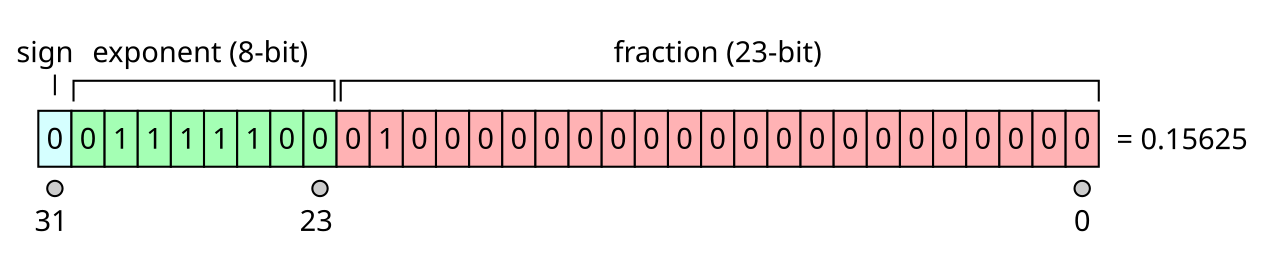
Two details in that picture cause most floating-point surprises. The exponent is biased, not
signed — you subtract 127 to get the real one, which is what makes bit patterns compare in the same
order as the numbers they encode. And the leading 1. of the mantissa is implicit: it is never
stored, which buys an extra bit of precision but means the encoding cannot represent zero at all
without a special case (exponent bits all zero), the first of several such carve-outs alongside
infinity and NaN.
The value is reconstructed as:
value = (-1)^sign × 1.fraction (binary) × 2^(exponent - bias)
Special cases use reserved exponent patterns:
| Exponent bits | Fraction | Meaning |
|---|---|---|
| All zero | Zero | ±0 |
| All zero | Non-zero | Subnormal: (-1)^sign × 0.fraction × 2^(1-bias) (no implicit leading 1) |
| All one | Zero | ±Infinity |
| All one | Non-zero | NaN |
Why 0.1 + 0.2 != 0.3
0.1 in binary is an infinitely repeating fraction (0.0001100110011...), just like 1/3 is
0.333... in decimal. It gets rounded to the nearest representable double, so 0.1 and 0.2
are each already slightly off before any addition happens — and the sum lands on a different
representable value than the rounded 0.3.
Practical Usage
#include <cstdio>
#include <cmath>

double a = 0.1 + 0.2;
printf("%.17f\n", a);              // 0.30000000000000004 — not exactly 0.3
printf("%s\n", (a == 0.3) ? "eq" : "not eq"); // "not eq"

// Correct way to compare floats: use a tolerance (epsilon), not ==
bool nearly_equal = std::fabs(a - 0.3) < 1e-9;

double nan_val = std::nan("");
bool is_nan = std::isnan(nan_val);         // true
bool nan_eq_itself = (nan_val == nan_val); // false — NaN is never equal to anything, even itself
Edge Cases & Pitfalls
Currency needs exact decimal arithmetic (cents must never silently drift). Floating point
rounding error compounds across many additions/multiplications. Use integer cents, a fixed-point
type, or a decimal type (std::decimal proposals, language-specific Decimal/BigDecimal types,
or database DECIMAL/NUMERIC columns) instead.
NaN != NaN is true, so std::sort and set/map ordering can misbehave if NaNs sneak into
comparisons — always check std::isnan() before comparing or sorting untrusted floating-point
data.
==on floating-point results of independent computations is almost always the wrong tool — rounding differences from a different instruction order (even mathematically equivalent code) can change the last bit.- Subnormals preserve "gradual underflow" near zero but are often computed much slower in hardware; some codebases explicitly flush them to zero for performance.
Comparisons
| Format | Total bits | Exponent bits | Fraction bits | Approx. decimal digits |
|---|---|---|---|---|
binary32 (float) | 32 | 8 (bias 127) | 23 | ~7 |
binary64 (double) | 64 | 11 (bias 1023) | 52 | ~15-17 |
| Fixed-point / integer cents | n (any) | — | — | Exact, no rounding error |
References
- IEEE, 754-2019 — IEEE Standard for Floating-Point Arithmetic — the authoritative spec.
- Wikipedia, Single-precision floating-point format and Double-precision floating-point format — cross-checked bit layouts above.
Books & Videos
- Randal E. Bryant & David R. O'Hallaron, Computer Systems: A Programmer's Perspective — Chapter 2 covers IEEE 754 in detail alongside integer representation.
- Computerphile, "Floating Point Numbers" — a short, accessible explanation of why
0.1 + 0.2 != 0.3.