USB — Architecture, Transfer Types & Speeds
USB (Universal Serial Bus) is the dominant peripheral connection standard for everything from mice and keyboards to external SSDs and displays. Unlike I2C or SPI, USB is host-centric: exactly one host controller manages a USB bus, devices never talk to each other directly, and every exchange is initiated by the host. USB also bundles several genuinely distinct things — a connector shape, an electrical/protocol standard, a family of speed classes, and (separately) a power-delivery negotiation protocol — that are easy to conflate but worth pulling apart.
Core Concepts
| Term | Meaning |
|---|---|
| Host controller | The single entity (built into the PC/SoC) that schedules and initiates all transfers on a USB bus. |
| Hub | A device that fans one upstream USB port out to multiple downstream ports, forming a tree. |
| Tiered-star topology | USB's overall shape: a host at the root, hubs as branch points, devices as leaves — never a direct device-to-device link. |
| Endpoint | A logical, unidirectional data source/sink inside a device (e.g., "endpoint 1 IN" for a mouse's movement reports). |
| Pipe | The logical connection the host maintains to a specific endpoint, carrying one of the four transfer types. |
| Transfer type | One of control, bulk, interrupt, or isochronous — each with different timing/reliability guarantees. |
| USB-C | A physical connector/cable standard — independent of which USB protocol version or speed is running over it. |
| USB Power Delivery (USB-PD) | A separate negotiation protocol for how much voltage/current a USB-C link supplies, layered on top of the connector. |
Mechanism
Host-centric, tiered-star topology
Every USB bus has exactly one host controller at the root of the tree. Hubs (which may be built into a monitor, laptop dock, or a standalone USB hub) extend the tree; devices are always leaves. A mouse and a keyboard plugged into the same hub cannot talk to each other directly — all traffic, even between two devices on the same hub, is scheduled and routed through the host.
One protocol, many connectors
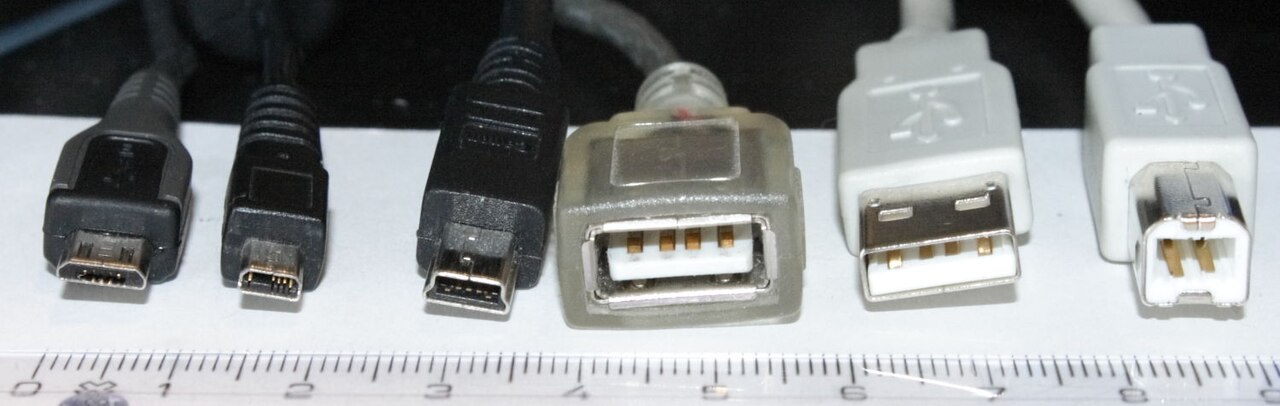
This is the single most confusing part of modern USB. A USB-C connector may carry USB 2.0 at 480 Mbit/s or USB4 at 40 Gbit/s; it may or may not support DisplayPort alternate mode; and it may negotiate anything from 2.5 W to 240 W of Power Delivery. Two identical-looking cables can differ by a factor of eighty in throughput. The shape tells you only what will physically plug in.
Endpoints, pipes, and the four transfer types
| Transfer type | Guarantee | Typical use |
|---|---|---|
| Control | Reliable, used for setup/configuration commands | Device enumeration, standard requests (every device has a control endpoint 0) |
| Bulk | Reliable (retried), no timing guarantee — gets whatever bandwidth is left over | Mass storage, file transfers, printers |
| Interrupt | Reliable, guaranteed minimum polling interval, small packets | Keyboards, mice, other low-latency/low-volume HIDs |
| Isochronous | Guaranteed bandwidth and timing, but no retries — dropped data stays dropped | Audio and video streaming, where a late-but-correct packet is worse than a small glitch |
The host controller polls/schedules every pipe according to its transfer type; isochronous and interrupt transfers get a reserved slice of each frame so that time-sensitive traffic isn't starved by a big bulk transfer competing for bandwidth.
Enumeration (brief)
Practical Usage
USB versions and their marketed speed names have changed naming schemes multiple times; the signaling rate is the fact that actually matters for "will this be fast enough":
| Signaling name | Introduced in | Signaling rate |
|---|---|---|
| Low-Speed | USB 1.0 | 1.5 Mbit/s |
| Full-Speed | USB 1.0/1.1 | 12 Mbit/s |
| High-Speed | USB 2.0 | 480 Mbit/s |
| SuperSpeed (USB 5Gbps) | USB 3.0 | 5 Gbit/s |
| SuperSpeed+ (USB 10Gbps) | USB 3.1 | 10 Gbit/s |
| USB 20Gbps (two-lane) | USB 3.2 | 20 Gbit/s |
| USB4 40Gbps | USB4 (v1.0) | 40 Gbit/s |
| USB4 80Gbps | USB4 v2.0 | 80 Gbit/s |
The USB-IF has renamed the same underlying signaling rates more than once (e.g., "SuperSpeed+" became "USB 3.2 Gen 2x1" became the current plain-language "USB 10Gbps"). When comparing devices, look for the Gbps figure, not the version number — "USB 3.2" alone is ambiguous between 5, 10, and 20 Gbit/s depending on which "Gen" a specific product implements.
Edge Cases & Pitfalls
A USB-C port or cable tells you nothing on its own about what speed, power, or even which protocol it carries. USB-C is a connector/cable mechanical standard that different things get tunneled through: USB 2.0 High-Speed, USB4, DisplayPort Alt Mode, Thunderbolt, and USB-PD can all use the identical-looking USB-C plug. A USB-C cable rated only for USB 2.0 speeds and low power will bottleneck or fail to charge a device that needs USB4 speeds or high-wattage Power Delivery, with no visual way to tell the cables apart.
Because isochronous transfers are not retried, a busy or marginal USB link can drop audio/video samples rather than stall — this shows up as audible glitches or dropped video frames rather than an error message, which can be confusing to debug.
- A USB hub's downstream bandwidth is shared among all connected devices — plugging several high-bandwidth devices into the same hub can bottleneck all of them even if each device individually supports a faster speed.
- USB Power Delivery (USB-PD) is a separate negotiation protocol layered on the USB-C connector's extra pins: source and sink negotiate a voltage/current contract (well beyond the original 5V USB power). A device can be electrically connected without either end successfully negotiating the power profile it expected, resulting in slow charging.
Comparisons
| Transfer type | Retried on error? | Bandwidth guarantee | Example device |
|---|---|---|---|
| Control | Yes | N/A (setup traffic) | Every device (enumeration) |
| Bulk | Yes | No — best effort | External hard drive |
| Interrupt | Yes | Guaranteed minimum polling rate | Keyboard, mouse |
| Isochronous | No | Guaranteed bandwidth/timing | Webcam, USB audio interface |
References
- USB Implementers Forum (USB-IF), USB Specifications — official USB 2.0, USB 3.2, and USB4 specifications.
- USB-IF, USB Data Performance Language Usage Guidelines — current marketing-name-to-Gbps mapping.
- USB-IF, USB Power Delivery Specification — official USB-PD reference.
Books & Videos
- Jan Axelson, USB Complete: The Developer's Guide — the standard developer-level reference covering transfer types, enumeration, and electrical/mechanical details.