DNS (Domain Name System)
DNS is the Internet's naming system — it translates human-readable names like example.com into the
IP addresses machines actually need to route traffic (see
Network Layer & Routing). It's a globally
distributed, hierarchical, heavily-cached database, and it's on the critical path of essentially
every Internet request: no DNS resolution, no connection.
Core Concepts
| Term | Meaning |
|---|---|
| Stub resolver | The small DNS client built into your OS — sends queries, doesn't do the recursive work itself. |
| Recursive resolver | A server (e.g., your ISP's, or 1.1.1.1 / 8.8.8.8) that does the full lookup on behalf of the stub resolver, caching results along the way. |
| Root server | One of 13 logical root name servers that know which servers are authoritative for each top-level domain (.com, .org, etc.). |
| TLD server | A server authoritative for a top-level domain, pointing to the authoritative servers for specific domains under it. |
| Authoritative name server | The server that holds the actual records for a specific domain (e.g., example.com's own DNS provider). |
| TTL (Time To Live) | How long, in seconds, a resolver may cache a record before it must re-query. |
Mechanism: The Resolution Chain
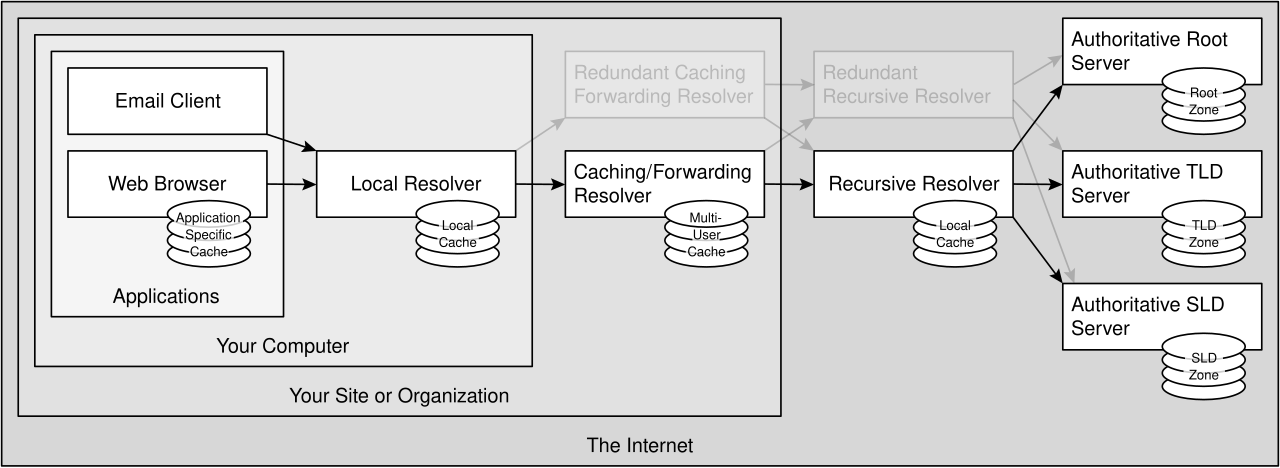
The recursive resolver caches results at every level (root/TLD referrals are effectively static and cached for a long time; the final answer is cached according to its own TTL), so most real-world lookups skip several of these steps entirely and answer straight from cache.
In deployment there are usually more caches in that chain than the sequence diagram suggests:
Zones and delegation
The name space is one tree, but no single organisation runs it. It is carved into zones, each managed by its own name server, and a zone hands control of a subtree to another server by delegating it:
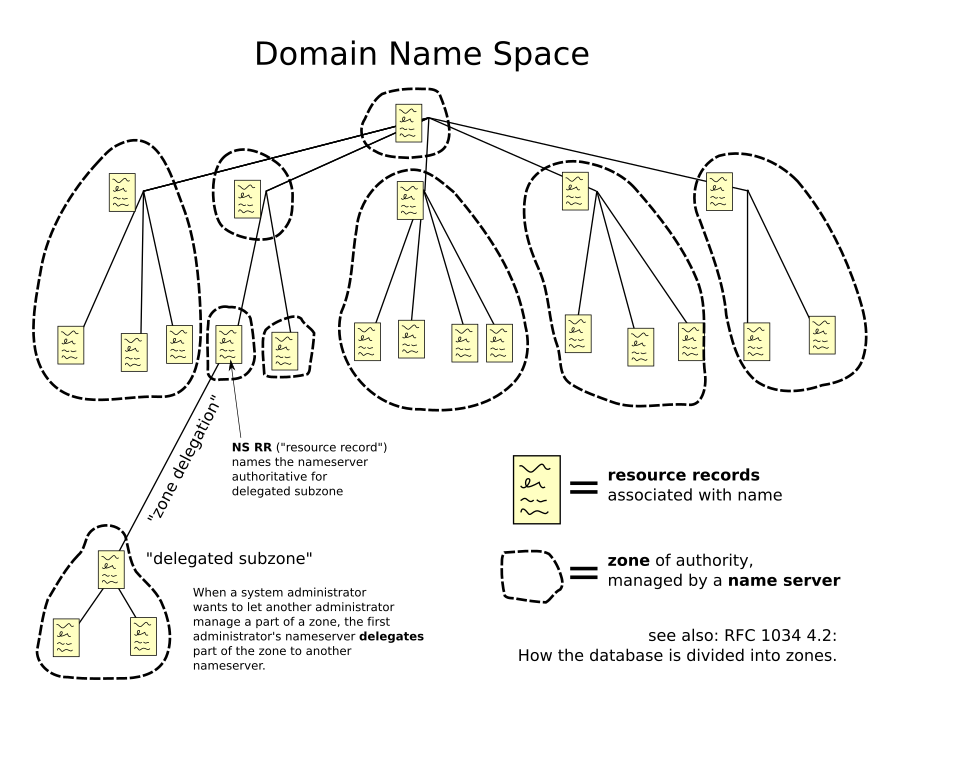
This is why the resolution chain above walks down level by level. Each step does not answer the question; it answers who to ask next, following delegations from the root until it reaches a server that is authoritative for the name in question.
Common Record Types
| Type | Purpose |
|---|---|
| A | Maps a name to an IPv4 address. |
| AAAA | Maps a name to an IPv6 address. |
| CNAME | Aliases one name to another name (which is then resolved again). |
| MX | Specifies the mail server(s) responsible for a domain, with priority. |
| TXT | Arbitrary text — commonly used for domain verification and email anti-spoofing (SPF/DKIM/DMARC). |
| NS | Delegates a (sub)domain to a specific set of authoritative name servers. |
Practical Usage: Reading dig Output
$ dig example.com A

; <<>> DiG 9.18.28 <<>> example.com A
;; global options: +cmd
;; Got answer:
;; ->>HEADER<<- opcode: QUERY, status: NOERROR, id: 41592
;; flags: qr rd ra; QUERY: 1, ANSWER: 1, AUTHORITY: 0, ADDITIONAL: 1

;; QUESTION SECTION:
;example.com.                   IN      A

;; ANSWER SECTION:
example.com.            86400   IN      A       93.184.216.34

;; Query time: 23 msec
;; SERVER: 192.168.1.1#53(192.168.1.1) (UDP)
;; WHEN: Wed Feb 12 10:15:30 UTC 2026
;; MSG SIZE  rcvd: 56
Reading this:
status: NOERROR— the query succeeded (a real failure would showNXDOMAIN, meaning the name doesn't exist).ANSWER SECTION:example.com. 86400 IN A 93.184.216.34— name, TTL in seconds (86400 = 24 hours), class (IN= Internet), record type, and the actual answer.Query time: 23 msecandSERVER: 192.168.1.1— this answer came from a local/recursive resolver, not directly from the authoritative server; querying the authoritative server directly (dig example.com A @ns1.example-dns.com) would show the real current TTL rather than a countdown from a cached copy.
Edge Cases & Pitfalls
Because resolvers cache answers for up to a record's TTL, updating a DNS record (e.g., pointing a domain at a new server) can take anywhere from seconds to the full TTL to propagate everywhere, depending on who has already cached the old value. Lowering a TTL before a planned change (and raising it back afterward) is a common technique to make cutovers faster.
- CNAME flattening/restrictions: a CNAME record cannot coexist with other record types at the same name (e.g., you can't have both a CNAME and an MX record for the same host name) — a frequent source of "why won't this record save" confusion.
- DNS mostly runs over UDP for speed (single round trip, no handshake), but falls back to TCP for responses too large for a single UDP datagram (e.g., DNSSEC-signed responses, or many records) — see Transport Layer: TCP & UDP.
- Plain DNS queries are unencrypted and can be observed or tampered with in transit; DNS-over-HTTPS (DoH) and DNS-over-TLS (DoT) exist specifically to close that gap.
Comparisons
| Record type | Resolves to | Can coexist with other records at same name? |
|---|---|---|
| A | IPv4 address | Yes |
| AAAA | IPv6 address | Yes |
| CNAME | Another name | No |
| MX | Mail server name (+ priority) | Yes |
| TXT | Arbitrary text | Yes |
References
- IETF, RFC 1034 — Domain Names — Concepts and Facilities.
- IETF, RFC 1035 — Domain Names — Implementation and Specification.
Books & Videos
- Kurose & Ross, Computer Networking: A Top-Down Approach — application-layer chapter covers DNS's hierarchy and caching model.
- Cloudflare's engineering blog has well-regarded, technically accurate articles explaining DNS internals and resolver behavior in detail.