Hard Disk Drives (HDDs)
A hard disk drive stores data as magnetized regions on spinning platters, read and written by a head that flies just above the surface on a moving actuator arm. Every part of that description is mechanical, and mechanical motion is slow compared to electronics — which is why an HDD's performance story is really a story about physics: how far the head has to travel, and how fast the platter spins underneath it.
Core Concepts
| Term | Meaning |
|---|---|
| Platter | A rigid, magnetically coated disk that stores data in concentric circular tracks; drives stack multiple platters on one spindle. |
| Read/write head | A tiny electromagnet, one per platter surface, that reads or writes the magnetic domains as the platter spins beneath it. |
| Actuator arm | The arm that moves all heads together, radially, to position them over a target track. |
| Seek time | Time for the actuator arm to move the head to the correct track. |
| Rotational latency | Time spent waiting for the platter to spin the target sector under the head. |
| Transfer time | Time to actually read/write the data once the head is positioned over it. |
| RPM (Revolutions Per Minute) | Platter spin speed — directly determines average rotational latency. |
Mechanism
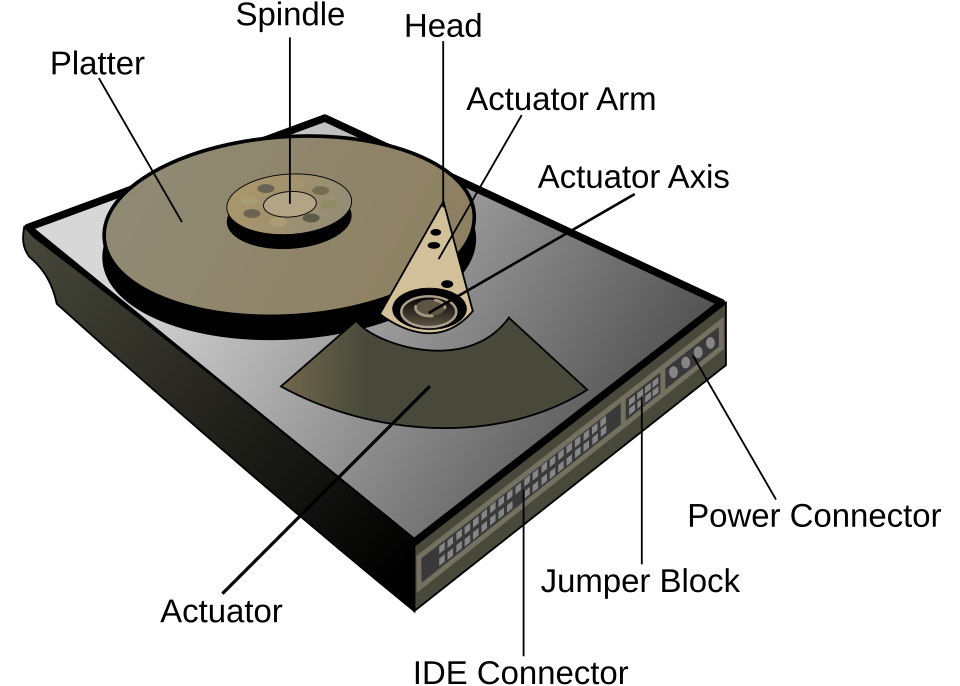
And the same parts in a real drive, with the lid off:
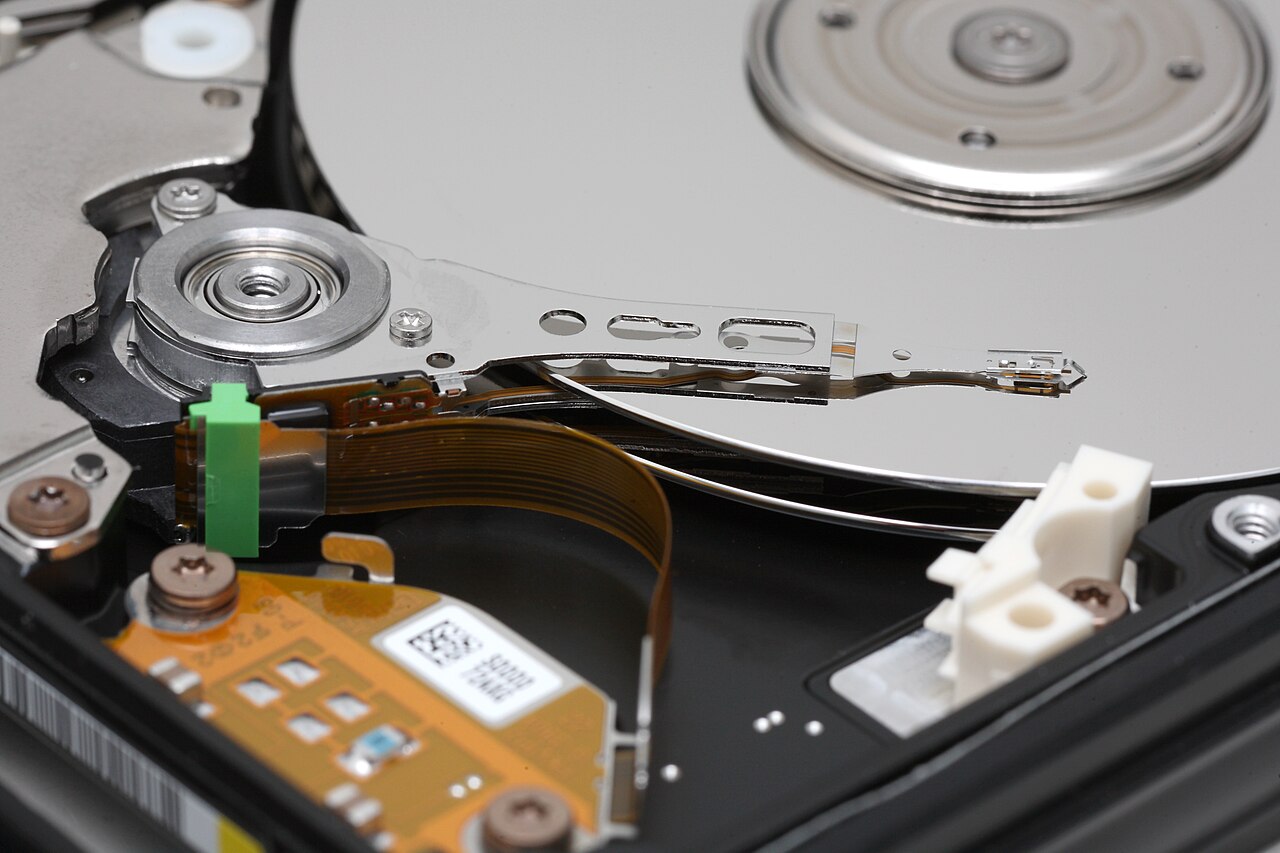
Everything expensive about an HDD follows from that photograph: there is exactly one head assembly, it is a physical arm, and it has to be moved and then waited on.
A single I/O request has to pay for three sequential delays before any bytes move:
Total access time = Seek time + Rotational latency + Transfer time
                     (move arm)   (wait for spin)      (read bits)
- Seek time depends on how far the current track is from the target track — a few hundred microseconds for an adjacent track, several milliseconds for a full sweep across the platter.
- Rotational latency is bounded by RPM: on average the head waits for half a revolution. A higher RPM directly shrinks this wait.
- Transfer time is comparatively small and roughly proportional to how much data is read once the head is in position.
| RPM | Time per revolution | Average rotational latency (½ revolution) |
|---|---|---|
| 5,400 | ~11.1 ms | ~5.6 ms |
| 7,200 | ~8.3 ms | ~4.2 ms |
| 10,000 | ~6.0 ms | ~3.0 ms |
| 15,000 | ~4.0 ms | ~2.0 ms |
If consecutive reads are on the same or an adjacent track, seek time drops to nearly zero and rotational latency is paid once for a large run of data — this is sequential I/O, and it's close to the drive's raw media bandwidth. Random I/O pays a full seek and rotational-latency penalty per request, since each request may land on a completely different track. This is why HDDs are excellent for large sequential transfers (backups, video, streaming writes) but poor for random-access workloads like OLTP database indexes or swap files.
Practical Usage
- Sequential-friendly workloads (archival storage, media streaming, write-ahead log files, backups) are a good fit for HDDs — they get near-peak throughput at a much lower cost per GB than flash.
- Storage engines that expect to run on HDDs are designed around this constraint: log-structured merge (LSM) trees batch random writes into large sequential ones, and traditional B-trees try to keep related pages physically close together to minimize seeks — see Databases.
- Enterprise/server drives (10,000-15,000 RPM, often SAS) trade capacity and cost for lower latency; desktop and archival drives (5,400-7,200 RPM, SATA) trade latency for capacity and cost per GB.
Edge Cases & Pitfalls
When a filesystem scatters a single file's blocks across non-adjacent tracks (fragmentation), what should be one sequential read becomes many small seeks. This is a much bigger deal on HDDs than on SSDs, which is why HDD-oriented filesystems and defragmentation tools exist at all.
Every HDD eventually fails mechanically — bearing wear, head crashes, or motor failure — regardless of how carefully it's used. Unlike flash wear (which scales with writes), HDD mechanical failure is largely time- and usage-independent in onset, so backups/RAID redundancy matter even for "lightly used" drives.
- Queuing many small random requests can help on HDDs if the drive/controller reorders them by physical position (native command queuing), but this optimization has limits and never approaches SSD random-I/O performance.
- RPM alone doesn't determine overall speed: a 7,200 RPM drive with a large cache and short seek times can beat a poorly designed 10,000 RPM drive on real workloads.
Comparisons
| Access pattern | Seek time paid? | Rotational latency paid? | Relative throughput |
|---|---|---|---|
| Large sequential read/write | Once per contiguous run | Once per contiguous run | Near maximum media bandwidth |
| Small random read/write | Per request | Per request | Orders of magnitude slower |
References
- SNIA (Storage Networking Industry Association), Educational Library — vendor-neutral storage technology tutorials, including HDD fundamentals.
- Alex Petrov, Database Internals (O'Reilly, 2019), Chapter 2 "B-Tree Basics" — covers HDD vs. SSD characteristics from a storage-engine design perspective.
Books & Videos
- Alex Petrov, Database Internals: A Deep Dive into How Distributed Data Systems Work (O'Reilly, 2019) — the "Hard Disk Drives" and "Solid State Drives" sections of Chapter 2 explain why disk-based structures are shaped the way they are.