Data Augmentation
The cheapest way to get more training data isn't collecting more — it's transforming the data you already have in ways that shouldn't change the label. A flipped photo of a cat is still a cat; a rotated photo of a stop sign is still a stop sign (probably). What you choose to augment with is a direct statement of what invariances you want the model to learn.
Augmentation encodes the invariances you want the model to have — which makes the wrong augmentation actively harmful.
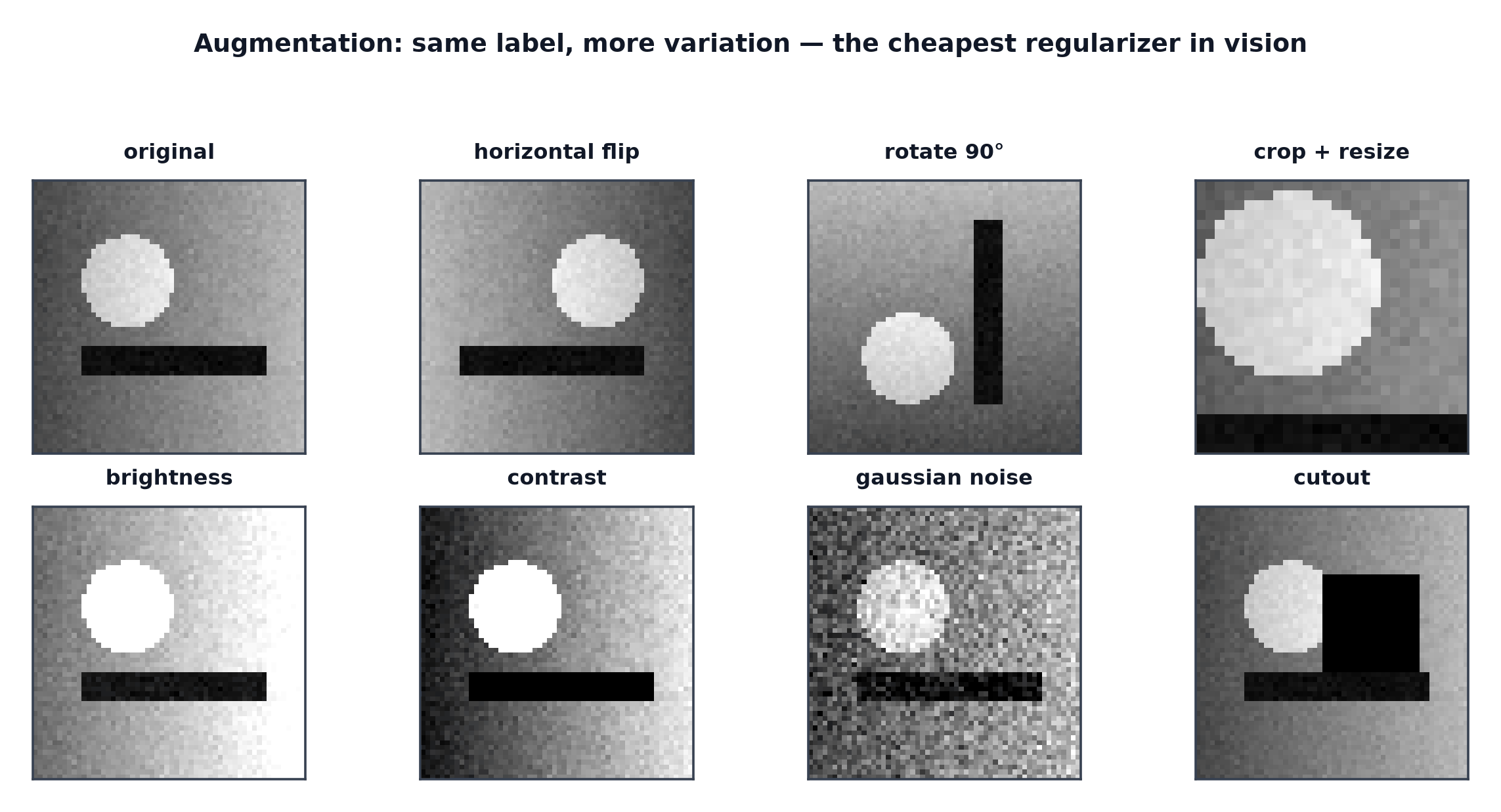
Augmentation as regularisation
From Regularization in Deep Nets: forcing the model to produce the same prediction across many synthetic variations of the same underlying image is a direct way to discourage memorising exact pixel values, one of the strongest and cheapest regularisers available for vision tasks.
Geometric transforms
Horizontal/vertical flip, rotation, random crop, scale (zoom) — all change the spatial arrangement of pixels while (usually) preserving the semantic content, teaching the model that the object's identity doesn't depend on its exact position, orientation, or scale in the frame.
Photometric transforms
Brightness, contrast, saturation, hue jitter, added noise, blur — change pixel values without changing spatial arrangement, teaching invariance to lighting conditions, camera quality, and minor visual noise rather than to spatial pose.
When a horizontal flip destroys the label
The core caveat behind the whole page: augmentation must genuinely preserve the label, and a horizontal flip doesn't for every task. Flipped text becomes unreadable/mirrored (destroying OCR labels); flipped digits can become different digits or invalid ("6" flipped isn't a valid digit reading); and for medical images, flipping can invert clinically meaningful laterality (left lung vs. right lung) — applying flip augmentation blindly to any of these produces training examples with silently wrong labels.
Cutout, mixup, cutmix
Cutout: mask out a random rectangular region of the image, forcing the model to make correct predictions even with part of the object occluded. Mixup and CutMix: covered fully in Regularization in Deep Nets — blend two images (and their labels) rather than augmenting a single image in isolation.
RandAugment and AutoAugment
Rather than hand-selecting which augmentations to apply and how strongly, AutoAugment searches (expensively, via reinforcement learning or similar) for the augmentation policy that maximises validation performance on a given dataset. RandAugment simplifies this dramatically: apply a small number of randomly-selected transforms at a single global magnitude setting, removing most of AutoAugment's search cost while achieving comparable practical results.
Train-time vs. test-time augmentation
Train-time: applied during training, as covered throughout this page. Test-time augmentation (TTA): apply several augmented versions of a single test image at inference time and average the resulting predictions — can provide a modest accuracy boost, at the direct cost of multiplying inference compute by however many augmented versions are averaged.
Augmentation must not touch the validation set
Exactly Datasets and DataLoaders's train/validation transform split: applying random augmentation to validation data introduces noise into the very numbers used to judge the model's progress, making validation scores non-reproducible run to run and harder to compare meaningfully across epochs or experiments.
Augmenting detection and segmentation labels alongside the image
For tasks with spatial labels — bounding boxes (Object Detection) or pixel masks (Semantic and Instance Segmentation) — a geometric augmentation applied to the image must be applied identically to the label. Rotating an image without correspondingly rotating its bounding-box coordinates produces a training example where the box no longer points at the actual object.
How much is too much
Excessively aggressive augmentation can push training examples so far from the true data distribution that they no longer represent realistic inputs the model will actually see at inference time — augmentation strength is itself a hyperparameter, tunable and capable of hurting performance if pushed past the point where the "augmented" examples stop resembling genuine data.
Selection table by domain
| Domain | Typical augmentations | Caution |
|---|---|---|
| Natural photos (general objects) | flip, crop, colour jitter, rotation | usually safe |
| Text/OCR images | none, or very limited (slight rotation/noise) | flips destroy readability |
| Medical images | crop, brightness/contrast, careful rotation | flips can invert laterality |
| Digit/character recognition | crop, slight rotation, noise | flips/large rotations create invalid characters |
Code: augmentation grid, augmented vs. unaugmented training, mixup
import numpy as np
import matplotlib.pyplot as plt
import torch
from torchvision import transforms
from PIL import Image

rng = np.random.default_rng(0)
img_array = rng.integers(0, 256, size=(128, 128, 3), dtype=np.uint8)
img = Image.fromarray(img_array, mode="RGB")

augmentations = {
    "original": transforms.Compose([]),
    "h-flip": transforms.RandomHorizontalFlip(p=1.0),
    "rotate": transforms.RandomRotation(30),
    "color jitter": transforms.ColorJitter(brightness=0.5, contrast=0.5, saturation=0.5),
    "random crop": transforms.RandomResizedCrop(128, scale=(0.5, 1.0)),
    "combined": transforms.Compose([
        transforms.RandomHorizontalFlip(), transforms.RandomRotation(15),
        transforms.ColorJitter(brightness=0.3),
    ]),
}

fig, axes = plt.subplots(1, len(augmentations), figsize=(18, 3))
for ax, (name, aug) in zip(axes, augmentations.items()):
    ax.imshow(np.array(aug(img)))
    ax.set_title(name); ax.axis("off")
plt.savefig("augmentation_grid.png")

# --- Mixup, constructed directly ---
img2_array = rng.integers(0, 256, size=(128, 128, 3), dtype=np.uint8)
t1 = transforms.ToTensor()(img)
t2 = transforms.ToTensor()(Image.fromarray(img2_array))
lam = 0.6
mixed = lam * t1 + (1 - lam) * t2
plt.figure(); plt.imshow(mixed.permute(1, 2, 0)); plt.title(f"mixup lambda={lam}")
plt.savefig("mixup_example.png")

# --- Small model: with vs without augmentation on a deliberately small training set ---
import torch.nn as nn
torch.manual_seed(0)
X_small = torch.randn(40, 3, 16, 16)  # small dataset, prone to overfitting
y_small = (X_small.mean(dim=(1,2,3)) > 0).long()
X_test = torch.randn(200, 3, 16, 16)
y_test = (X_test.mean(dim=(1,2,3)) > 0).long()

def train(use_noise_aug, steps=200):
    model = nn.Sequential(nn.Flatten(), nn.Linear(3*16*16, 32), nn.ReLU(), nn.Linear(32, 2))
    optimizer = torch.optim.Adam(model.parameters(), lr=0.01)
    for _ in range(steps):
        x = X_small + (torch.randn_like(X_small) * 0.3 if use_noise_aug else 0)
        optimizer.zero_grad()
        loss = nn.functional.cross_entropy(model(x), y_small)
        loss.backward(); optimizer.step()
    train_acc = (model(X_small).argmax(1) == y_small).float().mean().item()
    test_acc = (model(X_test).argmax(1) == y_test).float().mean().item()
    return train_acc, test_acc

for use_aug in [False, True]:
    train_acc, test_acc = train(use_aug)
    print(f"{'with' if use_aug else 'without'} augmentation: train_acc={train_acc:.3f}, test_acc={test_acc:.3f}")
See also
- Regularization in Deep Nets — the general regularisation framework augmentation instantiates for images.
- Transfer Learning for Vision — augmentation strategy when fine-tuning a pretrained backbone.