Images as Tensors
Before any model sees a pixel, an image is a grid of numbers — and the conventions for arranging and scaling those numbers disagree between nearly every library you'll touch. Almost every mysterious vision bug traces back to one of these conventions being silently wrong: a colour channel swapped, a value range mismatched, an axis order flipped.
Nearly every vision bug is a layout, range, or colour-order mismatch, not a model problem.
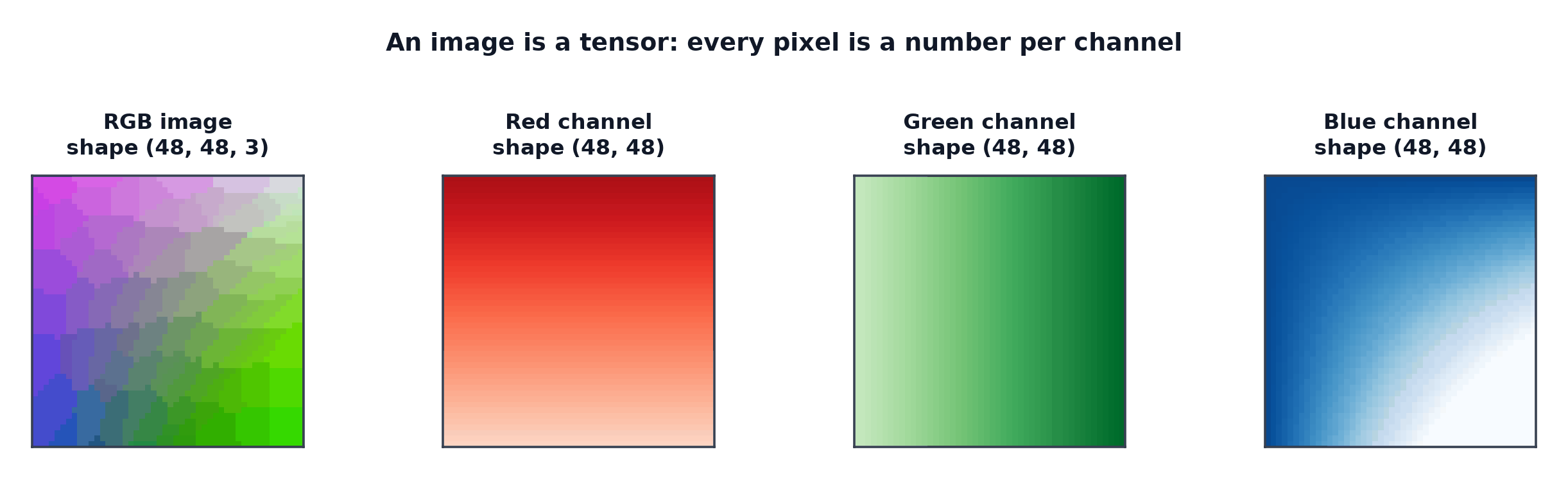
Pixels, channels, bit depth
A pixel is one spatial location's colour value; a channel is one colour component (red, green, blue) stored as a separate 2-D grid; bit depth (commonly 8 bits per channel, values 0–255) sets how finely colour is quantised.
Greyscale vs. RGB vs. RGBA
Greyscale: one channel. RGB: three channels (red, green, blue). RGBA: four channels, the fourth (alpha) encoding transparency — models trained on RGB images will error or silently misbehave if handed an unexpected fourth channel.
The layout wars: NCHW vs. NHWC
NCHW (batch, channels, height, width): PyTorch's convention. NHWC (batch, height, width, channels): TensorFlow's original convention, and the layout most image files are naturally stored in. Converting between them is a transpose, not a reshape — using the wrong one produces garbage output with no error message, since both are valid tensor shapes, just semantically different arrangements of the same numbers.
Value ranges
Raw image files decode to uint8 values in . Most deep learning pipelines convert to floating point, either (simple division by 255) or standardised (subtract a mean, divide by a standard deviation, per channel) — feeding a model trained on standardised inputs with raw values (or vice versa) produces wildly wrong activations from the very first layer.
Per-channel normalisation, and ImageNet statistics
Applied per channel . Because so many vision models are pretrained on ImageNet, its per-channel mean and standard deviation (roughly , for RGB) appear as the default normalisation constants across an enormous number of codebases and pretrained checkpoints, even for data that isn't ImageNet-like at all — using the wrong normalisation constants for a pretrained model is a subtle way to silently degrade its performance.
| Symbol | Meaning |
|---|---|
| per-channel mean and standard deviation used for normalisation |
Colour spaces, and the OpenCV BGR trap
RGB orders channels red-green-blue; OpenCV famously loads images as BGR (blue-green-red) by default — mixing an OpenCV-loaded image directly into a pipeline expecting RGB silently swaps the red and blue channels, producing a colour-inverted-looking (but not obviously broken) result that's easy to miss on cursory inspection. Other colour spaces (HSV, LAB) separate colour information differently and are occasionally used for specific augmentation or segmentation tasks.
Resizing, interpolation, and aspect-ratio distortion
Resizing to a model's expected input size requires choosing an interpolation method (nearest, bilinear, bicubic — trading speed for smoothness) and deciding whether to preserve aspect ratio (padding or cropping to fit) or allow distortion (stretching non-uniformly) — the latter can measurably hurt performance on tasks sensitive to object shape.
Cropping strategies
Centre crop: deterministic, standard for evaluation. Random crop: a form of augmentation (see Data Augmentation), standard for training. Five-crop: four corners plus the centre, sometimes averaged at inference time for a modest accuracy boost at higher compute cost.
EXIF rotation, the silent corruptor
Many cameras store the actual pixel data unrotated and instead record the correct orientation in EXIF metadata — an image library that ignores EXIF orientation will load and display the image sideways or upside-down, and a model will train on and predict from visually rotated data with no error raised anywhere in the pipeline.
Batching images of different sizes
Unlike variable-length text (padded via Datasets and DataLoaders's custom collate_fn), images of different sizes cannot be stacked into a single batch tensor at all without first resizing or padding them to a common shape — a mandatory preprocessing step, not an optional one, before batching.
Preprocessing parity between training and serving
The single most common vision production bug: the exact preprocessing pipeline (resize method, normalisation constants, colour order) used at training time must be reproduced exactly at inference time — the full treatment, including how to enforce this in practice, is in Deploying Vision Models.
Code: pipeline stages, a mis-normalisation, the BGR/RGB swap
import numpy as np
import torch
from torchvision import transforms
from PIL import Image

# --- A synthetic image standing in for a downloaded photo ---
rng = np.random.default_rng(0)
img_array = rng.integers(0, 256, size=(224, 224, 3), dtype=np.uint8)
img = Image.fromarray(img_array, mode="RGB")

print(f"raw PIL image: mode={img.mode}, size={img.size}")

transform = transforms.Compose([
    transforms.Resize((224, 224)),
    transforms.ToTensor(),  # HWC uint8 [0,255] -> CHW float [0,1]
    transforms.Normalize(mean=[0.485, 0.456, 0.406], std=[0.229, 0.224, 0.225]),
])
tensor = transform(img)
print(f"after transform: shape={tensor.shape} (CHW), dtype={tensor.dtype}, range=[{tensor.min():.2f}, {tensor.max():.2f}]")

# --- Mis-normalisation: feeding [0,255] values where [0,1]-normalised were expected ---
wrong_tensor = torch.tensor(img_array).permute(2, 0, 1).float()  # forgot the /255 and normalize
print(f"\nmis-normalized tensor range: [{wrong_tensor.min():.2f}, {wrong_tensor.max():.2f}]"
      f"  <- should be roughly [-2, 2] after correct normalization, not [0, 255]")

# --- BGR/RGB swap, visualised numerically ---
rgb_pixel = img_array[0, 0]
bgr_pixel = rgb_pixel[::-1]  # what OpenCV would hand you for the "same" pixel
print(f"\nRGB pixel: {rgb_pixel}")
print(f"BGR pixel (same data, different channel order): {bgr_pixel}")
print("-> feeding BGR data into an RGB-expecting model silently swaps red and blue everywhere")
See also
- Data Preprocessing and Features — the general preprocessing discipline this page specialises for images.
- Convolution Operation — the first operation applied to these correctly-prepared tensors.