GPU Training and Mixed Precision
The fastest way to make training slower is to leave the GPU waiting on the CPU — and the second fastest way to make it faster, after fixing that, is to stop computing every number with more precision than the task actually needs. Most real speedups come from these two unglamorous facts, not from a cleverer algorithm.
Most speedups come from keeping the GPU fed and from using fewer bits per number, not from a better algorithm.
CPU vs. GPU for this workload
A GPU's advantage is massive parallelism for the matrix multiplications and convolutions dominating neural network computation — thousands of simple cores versus a CPU's few complex ones. The trade: every operation must be batched and vectorised to actually use that parallelism; a Python loop over individual examples wastes nearly all of a GPU's potential.
.to(device) and the cost of transfers
Moving data between CPU and GPU memory (tensor.to("cuda")) is comparatively slow — moving a small tensor back and forth every step (e.g. to log a scalar with .item(), which implicitly syncs) can meaningfully slow training if done too frequently inside the hot loop.
Finding the bottleneck
Three regimes, and each has a different fix: GPU-bound (GPU utilisation near 100%, the model itself is the bottleneck — the input pipeline from Datasets and DataLoaders is not the issue) — reach for mixed precision, a larger batch size, or a smaller/faster model. Input-bound (GPU utilisation well below 100%, waiting on data) — the fixes are in Datasets and DataLoaders, not on this page. Synchronisation-bound (frequent CPU-GPU syncs, e.g. from logging every step) — batch logging less frequently.
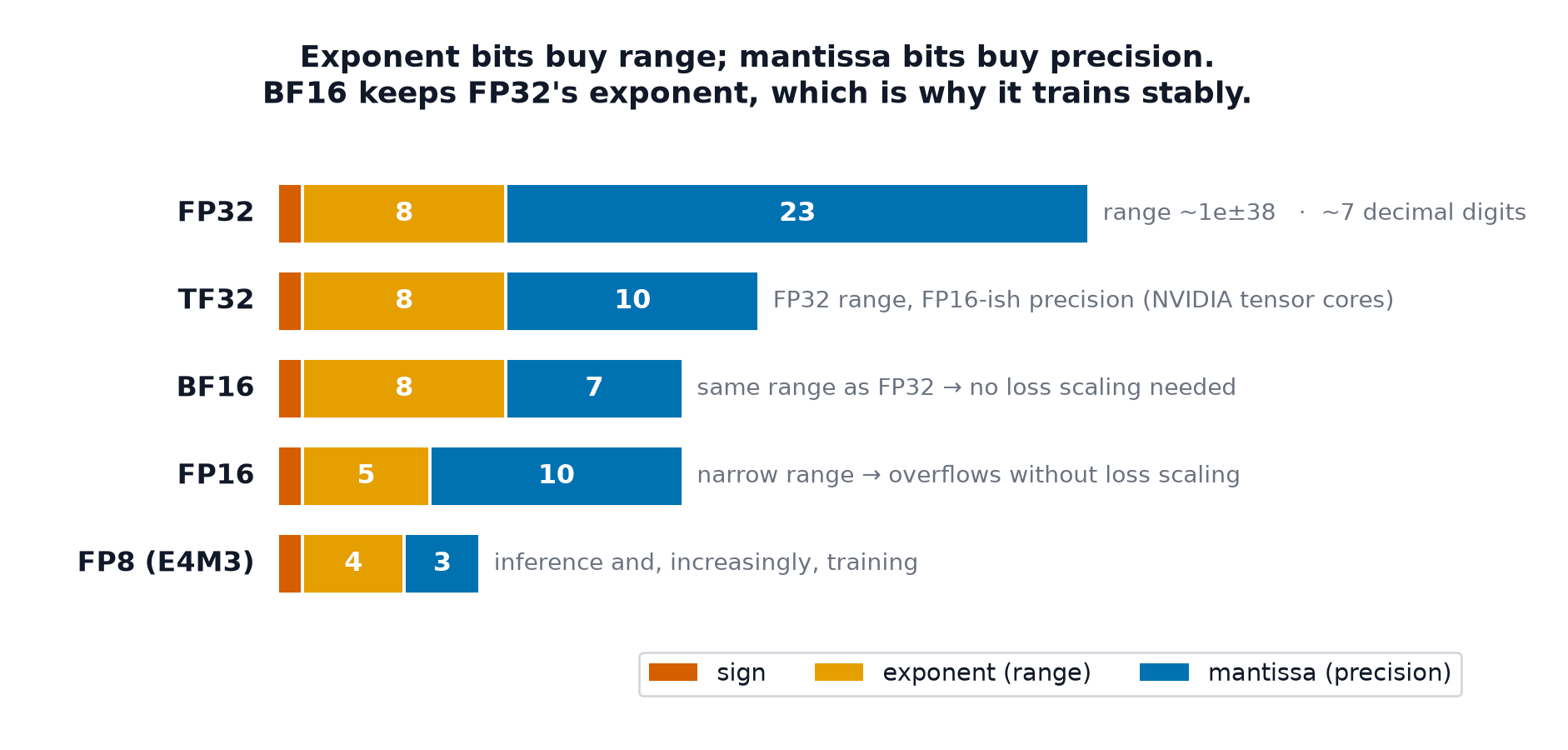
float32, float16, bfloat16
- float32 (single precision): the training default, 8 bits exponent, 23 bits mantissa.
- float16 (half precision): 5 bits exponent, 10 bits mantissa — half the memory, but a much smaller representable range, prone to underflow (very small gradients rounding to exactly zero) and overflow.
- bfloat16: 8 bits exponent (same range as float32), 7 bits mantissa (less precision than float16) — trades precision for keeping float32's dynamic range, making it more numerically robust for training than float16, at some cost in fine-grained precision.
Mixed precision: what stays in fp32
Mixed precision runs most operations (matrix multiplies, convolutions) in fp16/bf16 for speed and memory savings, while keeping select operations — notably the master copy of weights, and reductions/normalisation prone to precision loss — in fp32, to avoid the numerical instability that pure fp16 training would introduce.
torch.autocast and GradScaler
torch.autocast automatically selects which operations run in reduced precision and which stay in fp32, without manual per-operation casting. GradScaler multiplies the loss by a large scale factor before .backward(), which shifts small gradient values away from fp16's underflow range, then unscales the gradients back down before the optimiser step.
Loss scaling and the underflow it prevents
In fp16, gradients with magnitude below roughly round to exactly zero — silently discarding real, if small, gradient signal. Multiplying the loss by a scale factor (e.g. 1024 or more) before backpropagation proportionally scales every gradient up, moving small-but-real gradients back into fp16's representable range; the scale factor is divided back out before the weights are actually updated, so the effective update is unaffected.
| Symbol | Meaning |
|---|---|
| fp32 / fp16 / bf16 | 32-bit / 16-bit (half) / 16-bit (brain-float) floating-point formats |
| loss scale | the multiplier applied to the loss before backward, to prevent fp16 underflow |
Memory accounting
For a model with parameters trained with Adam: parameters (), gradients (), and two Adam moment buffers () — roughly values just for optimiser state, before counting activations at all. This is why optimiser choice (Adam vs. plain SGD, which needs no moment buffers) directly affects the maximum trainable model size on a given GPU.
Gradient checkpointing
Trades compute for memory: instead of caching every intermediate activation for the backward pass (as Forward Pass and Computational Graphs described), discard most of them during the forward pass and recompute them on demand during backpropagation — substantially reduces peak memory at the cost of a second forward pass through the checkpointed segments.
Batch size and its interaction with the learning rate
Doubling the batch size roughly halves gradient noise (averaging over more examples), which generally permits (and often benefits from) a correspondingly larger learning rate — the linear-scaling heuristic covered further in Distributed Training.
torch.compile
Just-in-time compiles the model's computational graph into optimised, fused kernels ahead of execution, reducing Python/framework overhead per operation — can provide a meaningful speedup with a single line of code (model = torch.compile(model)), at the cost of a compilation delay on the first few steps.
Diagnosis table for out-of-memory errors
| Symptom | Likely fix |
|---|---|
| OOM immediately at model creation | model too large for the GPU even before training data — reduce model size or use a bigger GPU |
| OOM only during training, not at model creation | reduce batch size, enable mixed precision, or use gradient checkpointing |
| OOM only at a specific input (e.g. long sequence) | that input's activation memory scales badly — check for attention-style costs |
| Memory grows steadily across epochs | a memory leak — commonly, accumulating tensors without .detach() in a logging list |
Code: fp32 vs. mixed precision, timing and memory; gradient checkpointing
import torch
import torch.nn as nn

device = "cuda" if torch.cuda.is_available() else "cpu"
model = nn.Sequential(nn.Linear(1024, 4096), nn.ReLU(), nn.Linear(4096, 1024)).to(device)
optimizer = torch.optim.Adam(model.parameters())
X = torch.randn(256, 1024, device=device)
y = torch.randn(256, 1024, device=device)

def train_step_fp32():
    optimizer.zero_grad()
    loss = ((model(X) - y) ** 2).mean()
    loss.backward()
    optimizer.step()
    return loss.item()

scaler = torch.cuda.amp.GradScaler(enabled=(device == "cuda"))
def train_step_amp():
    optimizer.zero_grad()
    with torch.autocast(device_type=device, dtype=torch.float16, enabled=(device == "cuda")):
        loss = ((model(X) - y) ** 2).mean()
    scaler.scale(loss).backward()
    scaler.step(optimizer)
    scaler.update()
    return loss.item()

import time
for name, step_fn in [("fp32", train_step_fp32), ("mixed precision", train_step_amp)]:
    if device == "cuda": torch.cuda.reset_peak_memory_stats()
    start = time.perf_counter()
    for _ in range(20):
        loss_val = step_fn()
    elapsed = time.perf_counter() - start
    peak_mem = torch.cuda.max_memory_allocated() / 1e6 if device == "cuda" else 0
    print(f"{name:16s}: {elapsed:.3f}s, peak memory {peak_mem:.1f} MB, final loss {loss_val:.4f}")

# --- Gradient checkpointing on a deep model ---
from torch.utils.checkpoint import checkpoint

class DeepBlock(nn.Module):
    def __init__(self, width): super().__init__(); self.fc = nn.Linear(width, width)
    def forward(self, x): return torch.relu(self.fc(x))

class CheckpointedNet(nn.Module):
    def __init__(self, depth, width, use_checkpoint):
        super().__init__()
        self.blocks = nn.ModuleList([DeepBlock(width) for _ in range(depth)])
        self.use_checkpoint = use_checkpoint
    def forward(self, x):
        for block in self.blocks:
            x = checkpoint(block, x, use_reentrant=False) if self.use_checkpoint else block(x)
        return x

print("\ngradient checkpointing trades recompute for reduced peak activation memory")
See also
- Datasets and DataLoaders — ruling out (or fixing) the input-bound case before optimising the model itself.
- Distributed Training — scaling beyond what a single GPU's memory and compute can handle.